
Key Responsibilities of a CIO in Modern Businesses

Updated: Jun 1
Strategic Planning and Technology Leadership
As a Chief Information Officer (CIO), your role is crucial. You develop and implement IT strategies that align with your organization's goals. This involves overseeing the adoption of new technologies that enhance operational efficiency and drive innovation.
Risk Management and Budget Oversight
You must identify and mitigate risks associated with information technology and data security. Additionally, managing the IT budget is essential. This ensures resources are allocated effectively and align with business priorities.
Stakeholder Engagement
Collaboration is key. You work with other executives to ensure IT initiatives support overall business objectives. This engagement fosters a culture of innovation and shared vision.
Emerging Trends Affecting CIOs
Cloud Computing
The adoption of cloud services is transforming IT infrastructure. It offers scalability and flexibility, which are vital for modern businesses.
Cybersecurity
With increasing cyber threats, protecting organizational data is more important than ever. A strong focus on cybersecurity measures is essential.
Data Analytics
Leveraging data analytics drives decision-making and enhances customer experiences. It enables businesses to make informed choices based on real-time data.
Artificial Intelligence
Integrating AI solutions improves operational efficiency and fosters innovation. AI can streamline processes and provide valuable insights.
Remote Work Technology
Supporting remote work is now a necessity. Effective collaboration tools and secure access to resources are critical for productivity.
Skills and Competencies for CIOs
Leadership and Strategic Thinking
You need the ability to lead and inspire IT teams while aligning IT initiatives with business strategy. This requires strong strategic thinking skills.
Technical Expertise and Communication
A deep understanding of current and emerging technologies is vital. Moreover, strong communication skills help articulate IT vision and strategy to non-technical stakeholders.
Change Management
Proficiency in managing organizational change related to technology implementations is crucial. This ensures smooth transitions and minimal disruptions.
Challenges Faced by CIOs
Rapid Technological Change
Keeping pace with the fast-evolving tech landscape is a significant challenge. Integrating new solutions requires constant vigilance.
Budget Constraints
Navigating limited budgets while meeting growing technology demands can be difficult. Prioritizing initiatives is essential.
Talent Acquisition
Attracting and retaining skilled IT professionals in a competitive market is a persistent challenge. Building a strong team is vital for success.
Data Governance
Ensuring compliance with data protection regulations while managing data effectively is crucial. This requires robust governance frameworks.
Alignment with Business Goals
Ensuring IT initiatives align with the broader business strategy is essential for success. This alignment fosters collaboration and shared objectives.
Implementing Microsoft Fabric for Scalable Data Solutions
Implementing Microsoft Fabric can transform how your enterprise handles data and analytics. However, many businesses face scalability problems that slow growth and complicate operations. These issues often stem from common mistakes during implementation. I want to share what I’ve learned about these pitfalls and how to avoid them, so your Microsoft Fabric setup supports your business as it grows.
Why Scalability Matters in Microsoft Fabric Deployments
Scalability means your system can handle increasing amounts of work or data without performance loss. For enterprises, this is critical. As data volumes grow and more users access analytics, your platform must keep up. Microsoft Fabric is designed to support large-scale data integration, analytics, and AI workloads. However, if you don’t plan and implement it carefully, you’ll hit bottlenecks. These bottlenecks can cause slow queries, failed data pipelines, and frustrated users. One key reason scalability issues arise is that Microsoft Fabric is a complex platform with many components. It requires thoughtful architecture and configuration to perform well at scale.
Common Microsoft Fabric Implementation Mistakes That Hurt Scalability
Let’s look at the most frequent mistakes I’ve seen that cause scalability problems in Microsoft Fabric projects.
1. Ignoring Data Partitioning and Distribution Strategies
Microsoft Fabric handles massive datasets by distributing data across nodes. If you don’t partition your data correctly, some nodes get overloaded while others sit idle. This imbalance slows down processing and query times. For example, if you store all customer data in one partition instead of spreading it by region or customer segment, queries targeting specific groups become slow. The system struggles to parallelize work efficiently.
2. Underestimating Resource Requirements
Many teams underestimate the compute, memory, and storage resources needed for their workloads. Microsoft Fabric components like OneLake and Data Factory require enough capacity to handle peak loads. If you allocate too few resources, your pipelines will fail or run slowly. This leads to delays in data availability and poor user experience.
3. Overlooking Data Governance and Security Setup
Skipping proper governance and security configurations can cause hidden performance issues. For example, overly restrictive access controls or inefficient encryption settings can add latency. Microsoft Fabric’s security features must be balanced with performance needs. Otherwise, you risk slowing down data access and processing.
4. Not Automating Monitoring and Alerts
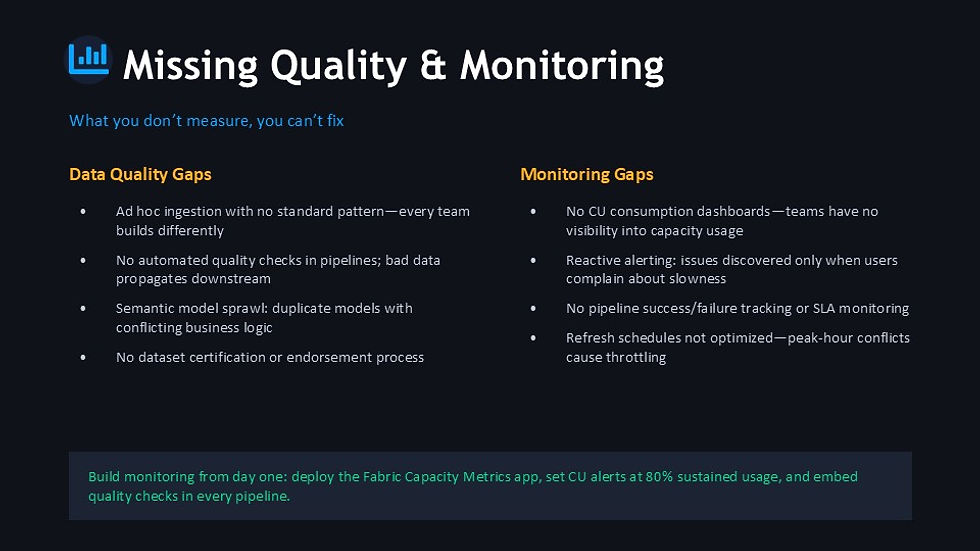
Without automated monitoring, you won’t catch performance degradation early. Microsoft Fabric offers tools to track pipeline health, query performance, and resource usage. Failing to set up alerts means problems grow unnoticed until users complain or systems fail. This reactive approach hurts scalability.
5. Poor Integration with Existing Systems
Microsoft Fabric often needs to connect with legacy databases, cloud services, and BI tools. If integration is not planned well, data movement becomes slow and error-prone. For example, using inefficient connectors or ignoring data format compatibility can cause bottlenecks. This limits how well your platform scales.
How Microsoft Fabric Products Can Help Avoid These Mistakes
Microsoft Fabric includes several products that, when used properly, support scalable enterprise solutions. I want to highlight two key products that can make a difference.

OneLake: The Foundation for Scalable Data Storage
OneLake is Microsoft Fabric’s unified data lake. It stores all your data in one place, making it easier to manage and analyze. OneLake supports data partitioning and distribution, which helps avoid the first mistake I mentioned. By organizing data efficiently, OneLake enables faster queries and better resource use.
Data Factory: Orchestrating Data Pipelines at Scale
Data Factory in Microsoft Fabric automates data movement and transformation. It supports complex workflows and integrates with many data sources. Using Data Factory properly means you can allocate resources dynamically and monitor pipeline health. This helps prevent resource underestimation and supports automation of alerts.
Best Practices to Ensure Scalability in Microsoft Fabric
Avoiding mistakes is easier when you follow proven best practices. Here are some steps I recommend:
Design your data partitions based on how your business uses data. Consider factors like geography, product lines, or customer segments. Test your partitioning strategy with sample queries to ensure even load distribution.
Analyze your peak data volumes and user concurrency. Allocate compute and storage resources accordingly. Use Microsoft Fabric’s autoscaling features where possible to handle spikes.
Set up role-based access controls that are as simple as possible. Use encryption methods that balance security and speed. Regularly review policies to remove unnecessary restrictions.
Use Microsoft Fabric’s built-in monitoring tools to track performance metrics. Set alerts for slow queries, pipeline failures, and resource limits. Respond quickly to issues.
Before going live, test all data connectors and integrations. Ensure data formats match and data flows smoothly between systems.

Real-World Example: Scaling Analytics with Microsoft Fabric and OneLake
A retail company I worked with struggled with slow sales reports during peak seasons. Their Microsoft Fabric setup had all sales data in one partition, causing query delays. We restructured their OneLake data partitions by store region and product category. We also increased Data Factory resources during peak hours. The result was a 50% reduction in report generation time and smoother data pipeline runs. The company could make faster decisions and improve inventory management.
Final Thoughts on Microsoft Fabric Scalability
Microsoft Fabric offers powerful tools for enterprise data and analytics. But scalability depends on how you implement it. Avoiding common mistakes like poor data partitioning, under-resourcing, and weak monitoring is key. Using products like OneLake and Data Factory thoughtfully can help you build a system that grows with your business. Keep testing, monitoring, and adjusting your setup to meet changing demands. If you want to build a scalable analytics platform, start with a clear plan and use Microsoft Fabric’s features to your advantage. That way, your data will support smarter decisions and faster growth.
If your organization is navigating similar challenges, I’m happy to discuss practical solutions in a 1:1 conversation.


Comments